Array Destructuring for Cleaner JavaScript Code
Master JavaScript array destructuring: syntax, skipping, defaults, swapping, and rest patterns, with runnable examples for cleaner code. Start here.
Open in
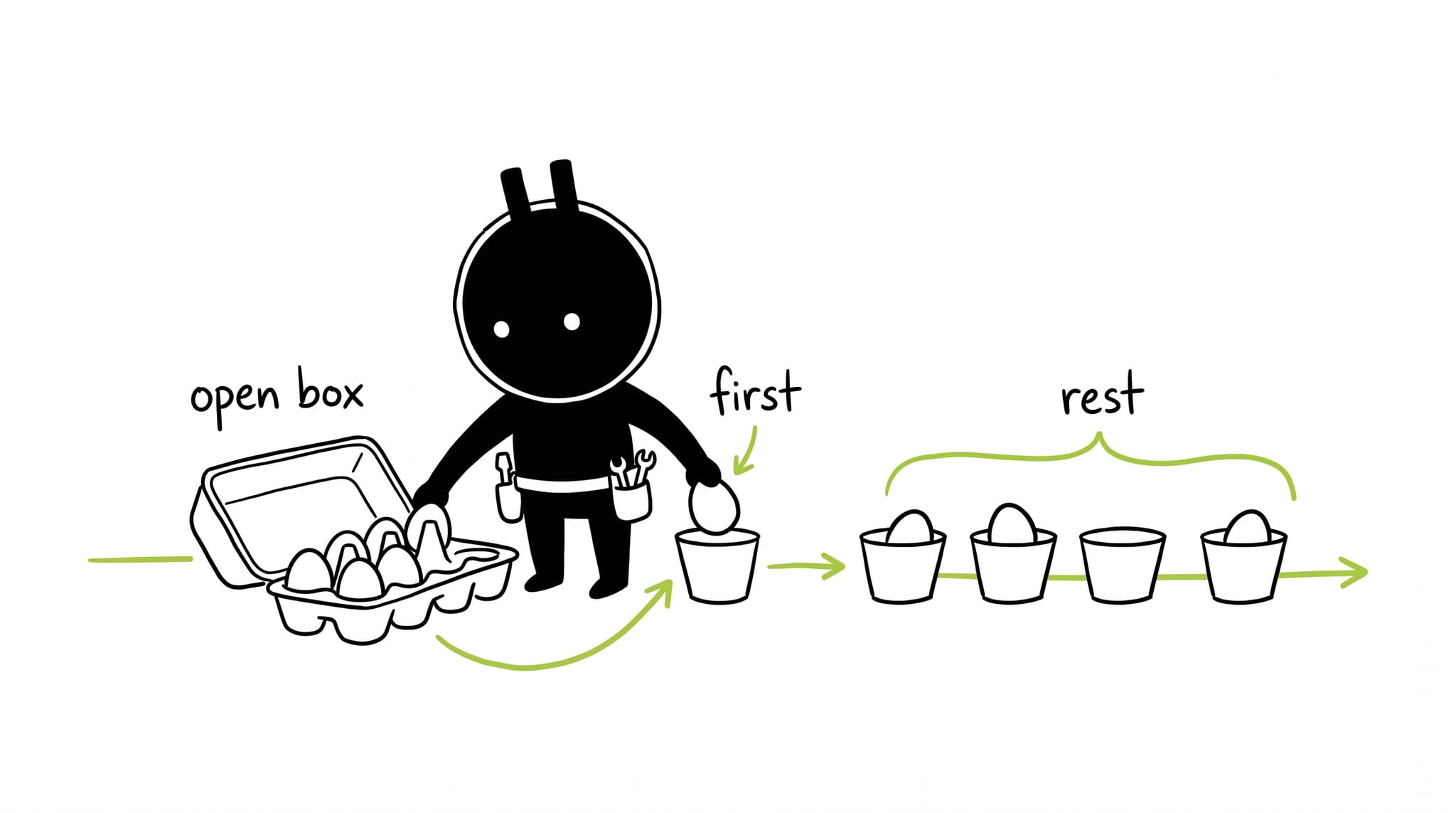
Array destructuring pulls multiple values out of an array and assigns them to variables in one line. It keeps the code short and avoids the mistakes that come from assigning elements one at a time.
Syntax
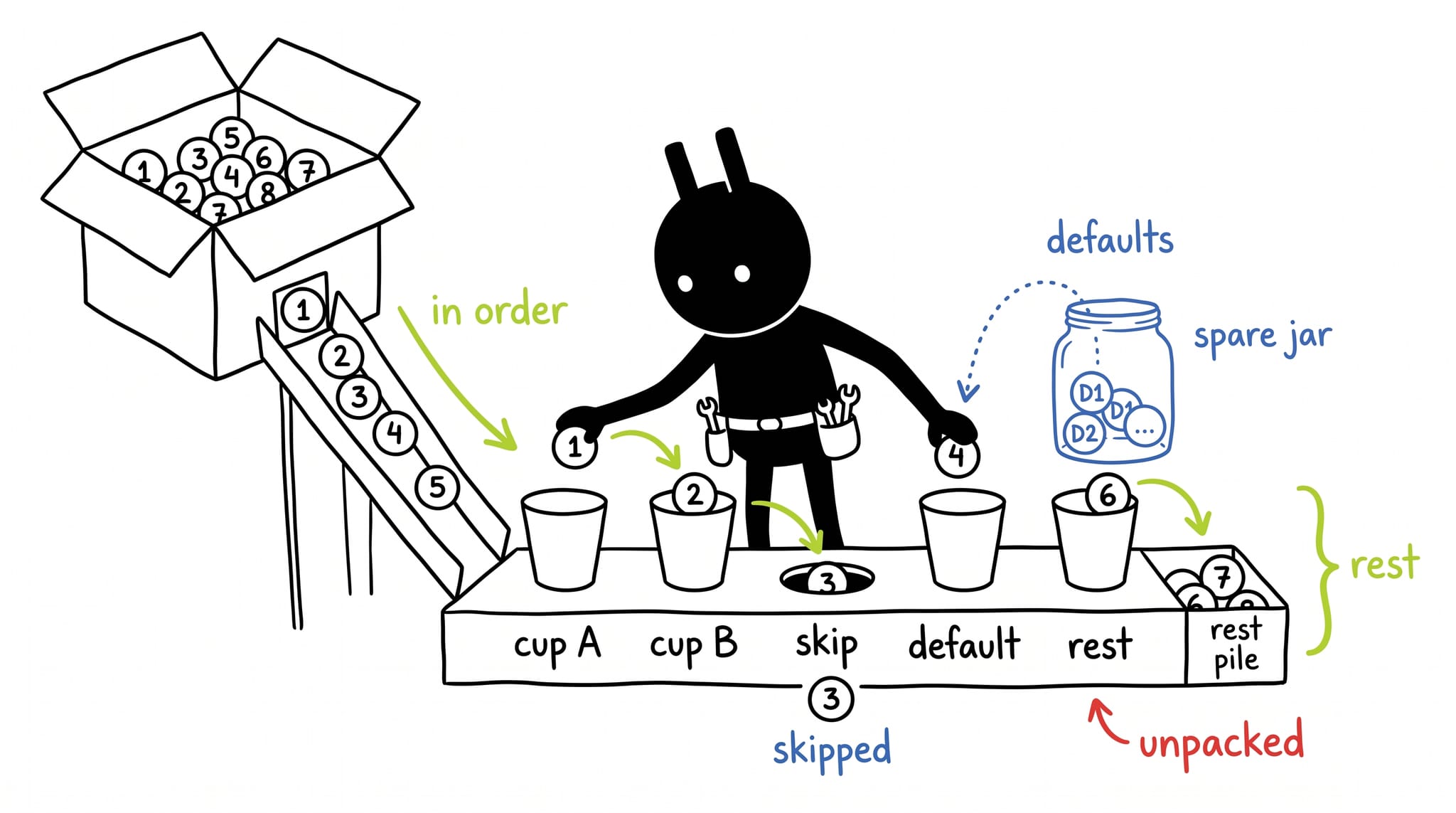
Position decides the assignment. The first variable takes the first element:
const [a, b] = [1, 2];
console.log(a, b); // Output: 1 2
a gets 1, b gets 2.
Skipping elements
Leave an empty slot for each element you want to skip:
const [a, , c] = [1, 2, 3];
console.log(a, c); // Output: 1 3
The comma with nothing between it skips 2. a gets 1, c gets 3.
Default values
A default kicks in when the slot is missing:
const [a = 0, b = 1] = [1];
console.log(a, b); // Output: 1 1
The array has no second element, so b falls back to 1.
Swapping variables
No temp variable needed:
let a = 1;
let b = 2;

[a, b] = [b, a];
console.log(a, b); // Output: 2 1
Examples
Say you have users and you want names and ages in separate arrays.
Without array destructuring, you might write code like this:
const users = [
  { name: "Alice", age: 30 },
  { name: "Bob", age: 40 },
  { name: "Charlie", age: 50 },
];

const names = [];
const ages = [];

for (const user of users) {
  names.push(user.name);
  ages.push(user.age);
}
console.log(names, ages); // Output: ["Alice", "Bob", "Charlie"] [30, 40, 50]
With array destructuring, you can write more concise and readable code like this:
const users = [
  { name: "Alice", age: 30 },
  { name: "Bob", age: 40 },
  { name: "Charlie", age: 50 },
];

const names = [];
const ages = [];

for (const { name, age } of users) {
  names.push(name);
  ages.push(age);
}
console.log(names, ages); // Output: ["Alice", "Bob", "Charlie"] [30, 40, 50]
Pull name and age straight out of each object in the loop. Same output, less indexing.
The results array below holds finishing order for a 100-meter sprint:
const results = ["Elton", "Primrose", "Bennifer", "Tim", "Jim", "Bim"];
console.log(results); // Output: ["Elton", "Primrose", "Bennifer", "Tim", "Jim", "Bim"]
The square brackets on the left assign by position. Names mean nothing. Only order matters:
const results = ["Elton", "Primrose", "Bennifer", "Tim", "Jim", "Bim"];
const [gold, silver, bronze] = results;
console.log(gold, silver, bronze); // Output: Elton Primrose Bennifer
gold gets ‘Elton’, silver gets ‘Primrose’, bronze gets ‘Bennifer’. Swap two names and the assignments follow them:
const results = ["Elton", "Primrose", "Bennifer", "Tim", "Jim", "Bim"];
const [silver, gold, bronze] = results;
console.log(silver, gold, bronze); // Output: Elton Primrose Bennifer
Destructuring never mutates the source. It only assigns. To catch the leftovers, add the ... rest operator:
const results = ["Elton", "Primrose", "Bennifer", "Tim", "Jim", "Bim"];
const [gold, silver, bronze, ...others] = results;
console.log(others); // Output: ["Tim", "Jim", "Bim"]
others collects ‘Tim’, ‘Jim’, and ‘Bim’.
Conclusion
That’s the whole pattern. Position decides which value lands in which variable, the rest operator catches the leftovers, and the source array never changes.